Brian Howard
Hard to explain, but he video should help.
https://web2.oasissalessoftware.com/OASIS/VKB/O4/CreateProject.mov
The quick summary is that we would like to add on screen that is not shown in the video. Basically a screen with different options fo the different types of projects at your agency. This would allow a quoter setting up a job on bid day to make the fewest steps to collect required information for the project. Yet another "spec job" button for the sales group to collect high level information that will be needed to track the job over time.
Lots of ideas - feedback is very much appreciated!
0
Comments
Please sign in to leave a comment.
Brian, I like the guided setup. Will there be an option to customize what fields show in those different types that they would select from the selection screen you described? Second question, can we make fields mandatory? That way the guided setup will make sure we have all fields entered and make for a cleaner quote.
Short term the goal is to come up with a standard set of fields used by everyone. However, there is already a way to customize the fields on a per company basis. The reason for the two step implementation is to get some consistency and generic terms that can be added to.
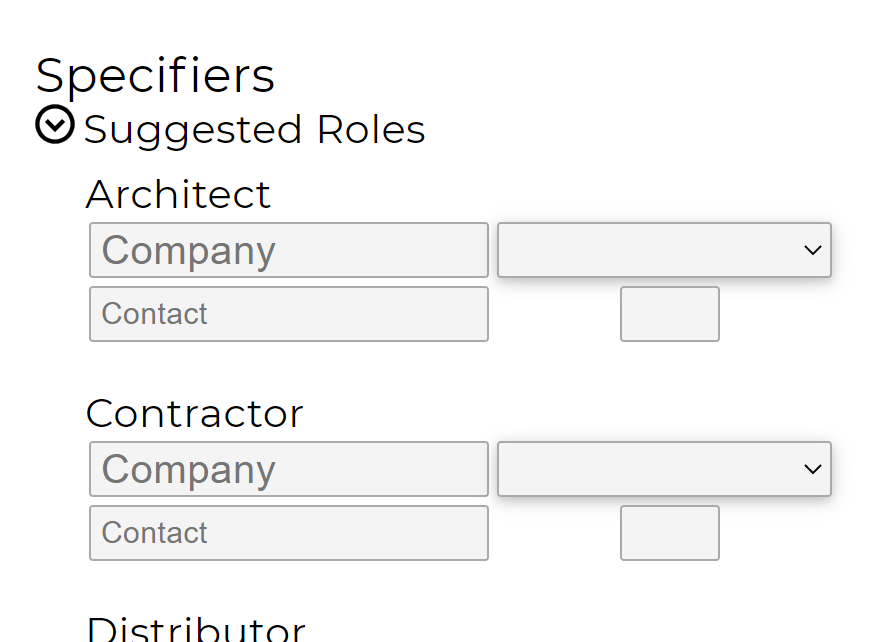
Is it possible to change the drop down in the specifiers section to show the customers already entered into Oasis, rather than the Assigned Sales person? Since we have already associated a sales person to the customers account in the Customers Editor, the assigned sales person should auto populate. I'd prefer to be able to select an existing customer from a search menu/drop down, rather than rely on the person entering the order to correctly match the spelling and type case of the existing entry in Oasis. Any mismatch here makes accurate customer reporting very difficult without going through and scrubbing data after the fact.